


Beauty Camera & Makeup Camera
4.619.00 Reviews
App Specs
- Version
- 1.4.1
- Updated On
- License
- Free
- Downloads
- 1,000,000+
- Developer
- 1 Bit
- Categories
- Beauty
- Platform
- Android, iOS
Screenshots
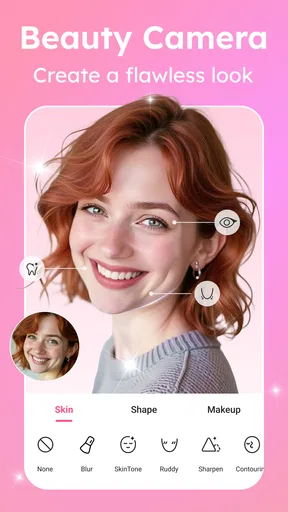
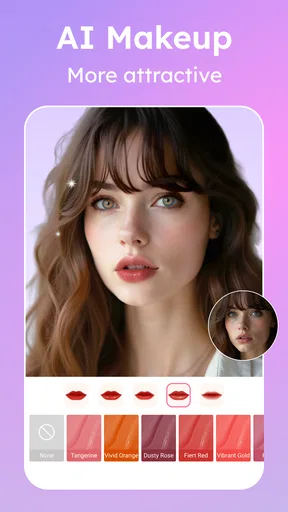
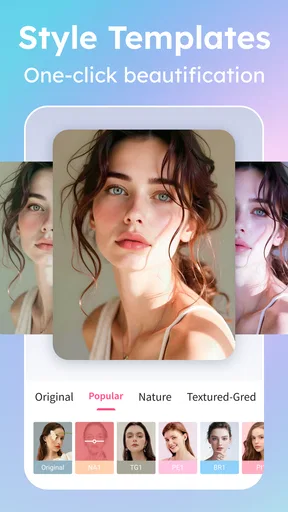
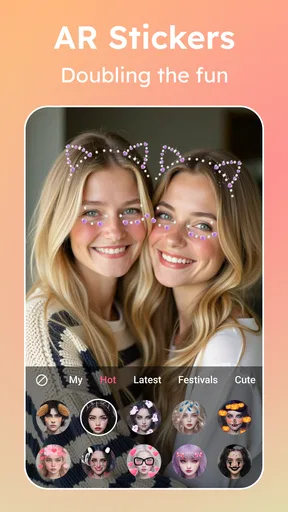
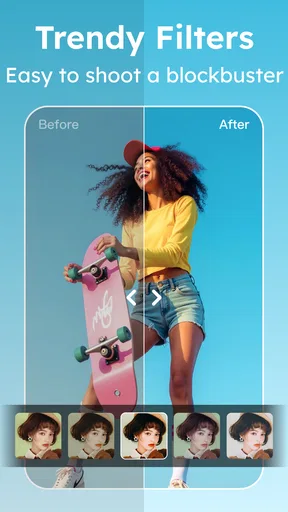
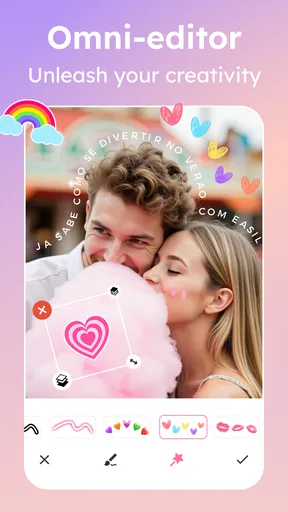
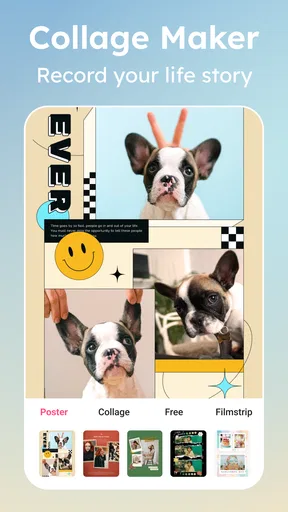
 Analysis by AppCompare
When I open Beauty Camera & Makeup Camera, I’m usually starting with an ordinary photo: a quick selfie before heading out, a portrait in uneven indoor light, or a picture that needs a little polish before I share it. The appeal is having beauty adjustments, makeup effects, stickers, and photo editing together, rather than jumping between several apps. I find it most useful when I want to make a small, deliberate change—not when I’m trying to turn a casual snapshot into a completely different face.
Choosing the right starting point
The first decision is whether to take a new picture or work with one I already have. For a planned selfie, I’d begin with a clean angle and reasonably even light. That gives the smoothing and shaping controls less work to do, and makes it easier to judge whether an edit still looks like me. If I’m editing an existing photo, I choose one where my face is visible and not heavily shadowed; strong lighting differences can make beauty effects look more obvious than intended.
This is a beauty-focused editor, so it suits portraits better than general-purpose jobs such as correcting a landscape or carefully retouching a product shot. I’d use it for a profile picture, a quick group-chat photo, or a playful image for social media. If the goal is precise color grading, layers, or detailed object removal, a fuller photo editor is usually a better fit. The useful question before starting is simple: do I want a fast portrait refresh, or a deeper editing project?
A practical edit, one choice at a time
Once I have a photo, I work from the broadest adjustment toward the smallest. I start with skin smoothing or shaping, then pause to compare the face with the original before adding makeup. This order matters: a strong shape adjustment can change how lipstick or eye effects sit visually, so applying everything at once makes it harder to tell which choice caused an unnatural result. I keep the first pass light, then add only what the photo seems to need.
For makeup, I treat the available looks as a preview rather than a replacement for real cosmetics. A more vivid lip or eye style can be fun in a close-up, but it may feel out of place in a photo taken in daylight or at a formal event. I’d match the intensity to the setting: restrained for a work profile, more expressive for a themed selfie. When a result looks too polished, backing off one adjustment usually helps more than piling on another effect.
Small details that make the result feel intentional
Stickers and AI effects are best as a separate creative choice, not an automatic final step. I’d try them on a copy or keep the original untouched until I know which version I prefer. A playful sticker can give a casual selfie personality, while the same effect can distract from a portrait meant to look understated. That difference is why I preview the image at its likely viewing size: an effect that looks subtle up close may dominate when the picture appears as a small profile icon.
My most useful habit is to stop between stages and look at the whole image, not just the face. A smooth complexion can draw attention to untouched areas such as hair, clothing, or the background, making the edit feel uneven. I also avoid changing several facial features together. One modest adjustment is easier to assess and undo than a stack of changes, and it makes the finished picture feel more like a good photo of me than a filter preset.
Worth Reading Before You Choose

EA SPORTS FC Mobile 26 Is a Bigger Football Game, but It Takes Time

Flipboard Shows What News Apps Must Do Beyond the Feed

Switching to Android Auto Means Rethinking Your Driving Routine

Google Calendar Makes a Crowded Week Easier to Manage

Ludo King Makes the Most of the Minutes Between Plans

Baby Panda World Brings Quick Play to Modern Phones, but Its Game Library Feels Busy
From editing to sharing
After I’m happy with the portrait, the next step is deciding where it belongs. A quick social post calls for a different finish from a picture I’m keeping for myself or sending privately. The app brings editing and photo-related tools into one place, which can shorten that path, but I still review the final image before sharing. I check for stray visual distractions, make sure the effect suits the audience, and choose the version that feels natural rather than simply the most dramatic.
That final check is especially helpful when I’ve used a live effect or made several edits. A preview on the screen is not always the same experience as seeing the whole image later in a feed or message. If I’m unsure, I compare the edited photo with the untouched one before deciding. The point is not to remove every feature I consider imperfect; it’s to make a photo I’m comfortable sending or posting.
The Magic Wand of Selfies
Let’s be real, who doesn’t love a little extra glow? With Beauty Camera & Makeup Camera, you’re not just snapping photos; you’re crafting masterpieces. The app promises a plethora of features aimed at enhancing your natural beauty without making you look like a completely different person. And trust me, it delivers.
First off, the interface is super user-friendly. Even if you’re not tech-savvy, you’ll find your way around easily. The first thing that catches your eye is the range of filters. From subtle enhancements to dramatic transformations, there’s something for everyone. The filters are like a warm hug for your face, smoothing out those little imperfections without erasing your uniqueness.
Features that Shine
Diving deeper, the editing tools are where the magic truly happens. You can adjust everything from skin tone to eye size with just a few taps. It’s like having a personal glam squad at your fingertips. My personal favorite? The makeup feature. Whether you want a bold lip or a smoky eye, the app’s got you covered. The makeup looks are surprisingly realistic, making it easy to swipe on a new look without the mess.
For those days when you’re feeling a bit extra, the app offers fun effects and stickers. Ever wondered what you’d look like as a cute kitten or with a flower crown? Now you can find out. It’s a blast experimenting with different styles and seeing your creativity come to life.
More Than Just a Pretty Face
But there’s more to Beauty Camera & Makeup Camera than meets the eye. The app also includes photo management tools, which allow you to organize your gallery effortlessly. You can create albums, tag your photos, and even share them directly to your favorite social media platforms. It’s a one-stop-shop for all your photo needs.
Another standout feature is the real-time beauty effects. Imagine being able to see your enhanced self live before you even click the shutter. It’s perfect for those who want to make sure they get the perfect shot on the first try. No more endless retakes!
Perfect for Everyone
Whether you’re a selfie queen or just someone who wants to look their best in photos, this app has something for everyone. It strikes a balance between enhancing your features and keeping things natural. Plus, it’s a great confidence booster. Who wouldn’t feel amazing after seeing themselves looking their best?
Made by 1 Bit, this free beauty app is rated for Everyone and has a 4.6 average from around 3.9 thousand ratings, with over one million installs. It first appeared on October 29, 2021, and version 1.4.1 requires Android 8.0 or later. Optional in-app purchases range from $0.99 to $14.99 per item, so I’d check what is included before paying for anything; the free starting point is useful for deciding whether its editing style suits you.
The app is available for both Android and iOS, making it accessible to a wide range of users. It runs smoothly on most devices, and I didn’t encounter any significant bugs or crashes during my testing. The developers have done a solid job ensuring that the app is both stable and reliable.
Where the workflow can snag
A dedicated selfie editor is convenient, but it also encourages quick decisions. The friction is less about learning complicated controls and more about judging how much editing is enough. Skin smoothing can flatten texture, while face-shape changes may look convincing in a close crop but less natural when the full image is visible. I recommend keeping an untouched original and checking the edited version at normal size before sharing. That small pause is a better safeguard than trusting the close-up preview alone.
There is also a trade-off between a live preview and editing after the shot. Real-time effects can help you frame a selfie with the intended look already visible, but they can narrow your choices if you decide later that you preferred the unedited expression. When the moment matters—say, a quick picture with friends—I’d capture a straightforward image first and experiment afterward if the editing flow allows it. For a planned solo portrait, trying a live look can help you settle on an expression and composition before taking the photo.
Who will get the most from it
I’d recommend this app to someone who regularly takes portraits and wants approachable controls for smoothing, shaping, makeup, and playful effects in one beauty-oriented space. It is particularly handy for a low-effort refresh before a video-call profile update or for making a casual selfie feel more finished without opening a desktop editor. The mix of practical portrait adjustments and lighthearted stickers also makes it easy to move between a polished look and something deliberately silly.
On a weekday morning, for example, I might take a quick selfie near a window before leaving home. I’d check the framing, soften the skin only slightly, try a restrained makeup look, and compare it with the original before saving or sharing. If the light is uneven, I’d fix the position or wait for better light rather than trying to solve everything with a filter. That workflow is faster and tends to preserve a more believable result than making several strong changes to a poorly lit photo.
It is less suited to people who want every edit to be technically precise, who prefer a completely untouched portrait, or who need a full creative suite for collages, layers, and detailed corrections. A phone’s built-in editor is often enough for simple cropping and brightness adjustments; a more advanced photo editor is preferable for careful retouching or complex compositions. I’d also skip beauty effects when accuracy matters more than presentation, such as documenting a makeup look whose real colors need to remain faithful.
How it fits beside other photo apps
Compared with the basic editor already on a phone, this app’s appeal is its emphasis on face-oriented changes and makeup rather than general image cleanup. That focus can save time when the subject is a selfie, because the controls are gathered around the look you are trying to create. In contrast, broad editing apps tend to offer more control over the whole photograph, but may take longer to learn and are not always as convenient for trying a quick beauty effect.
Social platforms can also offer filters, but those are most convenient when the end goal is to post immediately. A separate beauty camera makes more sense when I want to experiment before choosing where a picture goes, or when I want to keep a version for later. Neither approach is automatically better: if I only need one playful filter for a story, the platform’s own tools may be quicker; if I want to compare a few portrait treatments, a dedicated editor is a more natural place to start.
Making a sensible choice
Before settling on a finished photo, I’d ask three practical questions: does the face still look familiar, does the effect fit the setting, and would I be happy with this version if I saw it outside the editing screen? Those checks help with both subtle retouching and more dramatic makeup. For a group picture, I’d be cautious about editing only one face heavily, since it can create an obvious difference between people in the same frame. For a playful solo selfie, that same freedom may be exactly the point.
It is also worth thinking about how often you will use the paid options. The app is free to try, while in-app purchases are available; I would explore the basic workflow first and only consider a purchase if a specific paid option solves a need I actually have. Since beauty preferences are personal, the right test is not whether an effect looks impressive in isolation, but whether you like the image it produces on your own face and in your usual lighting.
Final Thoughts
In the era of social media, where images are everything, Beauty Camera & Makeup Camera is a game-changer. It’s not just about altering appearances; it’s about enhancing them and celebrating who you are. Whether you’re prepping for a big event or just want to add a little sparkle to your day, this app is ready to help you shine.
If you’re looking to step up your selfie game, this app is definitely worth a download. With its user-friendly interface, wide range of features, and impressive results, Beauty Camera & Makeup Camera is sure to become a staple in your app collection. So go ahead, strike a pose and let the app work its magic!
Pros
- User-friendly interface for quick edits.
- Wide range of makeup filters available.
- Real-time preview before capturing.
- High-quality output with natural effects.
- Regular updates with new features.
Cons
- Occasional ads interrupt editing flow.
- Some features require in-app purchases.
- Can drain battery quickly during use.
- May slow down older devices slightly.
- Limited offline functionality.
FAQs for Beauty Camera & Makeup Camera
What features does the Beauty Camera & Makeup Camera offer?
The Beauty Camera & Makeup Camera app provides a variety of features including real-time beautification, virtual makeup tools, skin smoothing, and blemish removal. It also offers filters, stickers, and camera effects to enhance your photos. These tools are designed to give users the ability to customize their look effortlessly.
Is the Beauty Camera & Makeup Camera app free to use?
The app is free to download and use, with many features available at no cost. However, it does offer in-app purchases for premium features and additional content. These can include advanced beauty tools, exclusive filters, and ad-free experiences. Users can choose to purchase these to enhance their app experience.
How user-friendly is the Beauty Camera & Makeup Camera app?
The app is designed with an intuitive interface, making it easy for users of all experience levels to navigate. Step-by-step instructions guide you through applying makeup and editing photos. The layout is clean, and most users find it straightforward to access and utilize the various features available.
Does the app require an internet connection to function?
While many features of the Beauty Camera & Makeup Camera app can be used offline, an internet connection is necessary for certain functionalities. These include downloading new filters, accessing in-app purchases, and sharing your edited photos on social media platforms. Offline use is generally supported for basic beautification and photo editing.
What devices are compatible with the Beauty Camera & Makeup Camera app?
The app is available for both Android and iOS devices. It requires a relatively recent operating system to function optimally, so users should ensure their device meets the minimum system requirements. Regular updates are provided to ensure compatibility with the latest OS versions and to add new features.


